


Salut.
Nu am mai deschis pana acum un server de metin2 si am decis sa incerc si eu...
Mi am luat un vps / domeniu ..
Am luat un server file de pe j4m si am inceput sa il bag pe host + mysql...
Din pacate cand ii dau sa il pornesc imi da erorile de mai jos.....
https://i.postimg.cc/XqLrCct1/c491690f- ... a33f67.jpg
Problema deschidere server
-
SkyLine

-

- Mesaje: 2655
- Membru din: 12 Dec 2013, 23:37
- Server: Miraj2-Online
- Regat: Jinno
- Aprecieri: 520
- Mulţumiri: 987
- Discord: Copiază ID
- Contact:
Medalii


Cu ce Doamne iarta-ma de Nokia din 1900 toamna ai facut poza...?
1 > Foloseste modelul de postare: probleme/model-postare-intrebare-sau-pr ... 67107.html
2 > Fa o poza mai mare, da-ti Edit la topic si pune-o ...
Edit. 3 > Dupa ce m-am chiorat mai bine in ecran sa vad ce e acolo, vad ca nu-ti gaseste fisierele din game.
Vad ca ai /usr/home/game, tu acolo.
Mergi unde ai pus tu folderul game, presupun ca este /usr/game -> intra in fisierul "start.sh" -> peste tot unde ai "/usr/home/game/" modifica in "/usr/game/" sau unde ai tu folderul. In caz ca esti incepator -> "usr" este unul din folderele din meniul principal, unde pui tu game-ul serverului. Daca ai "game", direct in "usr", atunci calea ta catre fisiere va fi "/usr/game/", in loc de "/usr/home/game/" in start.sh
1 > Foloseste modelul de postare: probleme/model-postare-intrebare-sau-pr ... 67107.html
2 > Fa o poza mai mare, da-ti Edit la topic si pune-o ...
Edit. 3 > Dupa ce m-am chiorat mai bine in ecran sa vad ce e acolo, vad ca nu-ti gaseste fisierele din game.
Vad ca ai /usr/home/game, tu acolo.
Mergi unde ai pus tu folderul game, presupun ca este /usr/game -> intra in fisierul "start.sh" -> peste tot unde ai "/usr/home/game/" modifica in "/usr/game/" sau unde ai tu folderul. In caz ca esti incepator -> "usr" este unul din folderele din meniul principal, unde pui tu game-ul serverului. Daca ai "game", direct in "usr", atunci calea ta catre fisiere va fi "/usr/game/", in loc de "/usr/home/game/" in start.sh
-
Titan

-

- Mesaje: 2783
- Membru din: 01 Iun 2015, 15:09
- Server: In curand.
- Regat: Chunjo
- Aprecieri: 42
- Mulţumiri: 377
- Rezolvări prob.: 3
- Discord: Copiază ID
- Contact:
Medalii
Fratele meu.. Folosește modelul de postare și fa print screen nu poze cu telefonul la monitor
Am înțeles că n ai mai deschis servere, dar nici pc uri n ai mai folosit?
Am înțeles că n ai mai deschis servere, dar nici pc uri n ai mai folosit?

-
SkyLine
-
- Mesaje: 2655
- Membru din: 12 Dec 2013, 23:37
- Server: Miraj2-Online
- Regat: Jinno
- Aprecieri: 520
- Mulţumiri: 987
- Discord: Copiază ID
- Contact:
Medalii
Ok...vma scrie: ↑30 Ian 2022, 13:32 Am facut exact cum mi ai spus si imi da alte errori....
https://postimg.cc/XZB2tYFt
1 -> Intra in folderul game unde ai "sh start.sh", fa poza si posteaz-o aici
2. -> Intra in start.sh, fa inca o poza si posteaz-o aici
Asta este in start.sh
#!/bin/sh
echo -e "\033[32m Metin2 - Ce canal doriți să deschideți? \033[0m"
echo -e "\033[32m
1 - (1) CH1 \n
2 - (2) CH1, CH2 \n
3 - (3) CH1, CH2, CH3 \n
4 - (4) CH1, CH2, CH3, CH4 \n
5 - (5) Anulează Acțiunea! \033[0m"
read chs
case $chs in
1*)
echo -e "\033[31m Starting DB ..\033[0m"
cd /usr/game/server/db
./db &
sleep 5
clear
echo -e "\033[31m \n Starting AUTH ..\033[0m"
cd /usr/game/server/auth
./game &
sleep 5
clear
echo -e "\033[31m \n Starting CH1, CORE1 ..\033[0m"
cd /usr/game/server/ch1/core1
./game &
sleep 5
clear
echo -e "\033[31m \n Starting GAME99, CORE1 ..\033[0m"
cd /usr/game/server/game99/core1
./game &
sleep 5
clear
;;
2*)
echo -e "\033[31m Starting DB ..\033[0m"
cd /usr/game/server/db
./db &
sleep 5
clear
echo -e "\033[31m \n Starting AUTH ..\033[0m"
cd /usr/home/game/server/auth
./game &
sleep 5
clear
echo -e "\033[31m \n Starting CH1, CORE1 ..\033[0m"
cd /usr/game/server/ch1/core1
./game &
sleep 5
clear
echo -e "\033[31m \n Starting CH2, CORE1 ..\033[0m"
cd /usr/game/server/ch2/core1
./game &
sleep 5
clear
echo -e "\033[31m \n Starting GAME99, CORE1 ..\033[0m"
cd /usr/game/server/game99/core1/
./game &
sleep 5
clear
;;
3*)
echo -e "\033[31m Starting DB ..\033[0m"
cd /usr/game/server/db
./db &
sleep 5
clear
echo -e "\033[31m \n Starting AUTH ..\033[0m"
cd /usr/game/server/auth
./game &
sleep 5
clear
echo -e "\033[31m \n Starting CH1, CORE1 ..\033[0m"
cd /usr/game/server/ch1/core1
./game &
sleep 5
clear
echo -e "\033[31m \n Starting CH2, CORE1 ..\033[0m"
cd /usr/game/server/ch2/core1
./game &
sleep 5
clear
echo -e "\033[31m \n Starting CH3, CORE1 ..\033[0m"
cd /usr/game/server/ch3/core1
./game &
sleep 5
clear
echo -e "\033[31m \n Starting GAME99, CORE1 ..\033[0m"
cd /usr/game/server/game99/core1
./game &
sleep 5
clear
;;
4*)
echo -e "\033[31m Starting DB ..\033[0m"
cd /usr/game/server/db
./db &
sleep 5
clear
echo -e "\033[31m \n Starting AUTH ..\033[0m"
cd /usr/game/server/auth
./game &
sleep 5
clear
echo -e "\033[31m \n Starting CH1, CORE1 ..\033[0m"
cd /usr/game/server/ch1/core1
./game &
sleep 5
clear
echo -e "\033[31m \n Starting CH2, CORE1 ..\033[0m"
cd /usr/game/server/ch2/core1
./game &
sleep 5
clear
echo -e "\033[31m \n Starting CH3, CORE1 ..\033[0m"
cd /usr/game/server/ch3/core1
./game &
sleep 5
clear
echo -e "\033[31m \n Starting CH4, CORE1 ..\033[0m"
cd /usr/game/server/ch4/core1
./game &
sleep 5
clear
echo -e "\033[31m \n Starting GAME99, CORE1 ..\033[0m"
cd /usr/game/server/game99/core1
./game &
sleep 5
clear
;;
5*)
clear
echo -e "\033[32m \n Acțiune Anulată!\033[0m"
;;
esac
Poza ce e in game !

#!/bin/sh
echo -e "\033[32m Metin2 - Ce canal doriți să deschideți? \033[0m"
echo -e "\033[32m
1 - (1) CH1 \n
2 - (2) CH1, CH2 \n
3 - (3) CH1, CH2, CH3 \n
4 - (4) CH1, CH2, CH3, CH4 \n
5 - (5) Anulează Acțiunea! \033[0m"
read chs
case $chs in
1*)
echo -e "\033[31m Starting DB ..\033[0m"
cd /usr/game/server/db
./db &
sleep 5
clear
echo -e "\033[31m \n Starting AUTH ..\033[0m"
cd /usr/game/server/auth
./game &
sleep 5
clear
echo -e "\033[31m \n Starting CH1, CORE1 ..\033[0m"
cd /usr/game/server/ch1/core1
./game &
sleep 5
clear
echo -e "\033[31m \n Starting GAME99, CORE1 ..\033[0m"
cd /usr/game/server/game99/core1
./game &
sleep 5
clear
;;
2*)
echo -e "\033[31m Starting DB ..\033[0m"
cd /usr/game/server/db
./db &
sleep 5
clear
echo -e "\033[31m \n Starting AUTH ..\033[0m"
cd /usr/home/game/server/auth
./game &
sleep 5
clear
echo -e "\033[31m \n Starting CH1, CORE1 ..\033[0m"
cd /usr/game/server/ch1/core1
./game &
sleep 5
clear
echo -e "\033[31m \n Starting CH2, CORE1 ..\033[0m"
cd /usr/game/server/ch2/core1
./game &
sleep 5
clear
echo -e "\033[31m \n Starting GAME99, CORE1 ..\033[0m"
cd /usr/game/server/game99/core1/
./game &
sleep 5
clear
;;
3*)
echo -e "\033[31m Starting DB ..\033[0m"
cd /usr/game/server/db
./db &
sleep 5
clear
echo -e "\033[31m \n Starting AUTH ..\033[0m"
cd /usr/game/server/auth
./game &
sleep 5
clear
echo -e "\033[31m \n Starting CH1, CORE1 ..\033[0m"
cd /usr/game/server/ch1/core1
./game &
sleep 5
clear
echo -e "\033[31m \n Starting CH2, CORE1 ..\033[0m"
cd /usr/game/server/ch2/core1
./game &
sleep 5
clear
echo -e "\033[31m \n Starting CH3, CORE1 ..\033[0m"
cd /usr/game/server/ch3/core1
./game &
sleep 5
clear
echo -e "\033[31m \n Starting GAME99, CORE1 ..\033[0m"
cd /usr/game/server/game99/core1
./game &
sleep 5
clear
;;
4*)
echo -e "\033[31m Starting DB ..\033[0m"
cd /usr/game/server/db
./db &
sleep 5
clear
echo -e "\033[31m \n Starting AUTH ..\033[0m"
cd /usr/game/server/auth
./game &
sleep 5
clear
echo -e "\033[31m \n Starting CH1, CORE1 ..\033[0m"
cd /usr/game/server/ch1/core1
./game &
sleep 5
clear
echo -e "\033[31m \n Starting CH2, CORE1 ..\033[0m"
cd /usr/game/server/ch2/core1
./game &
sleep 5
clear
echo -e "\033[31m \n Starting CH3, CORE1 ..\033[0m"
cd /usr/game/server/ch3/core1
./game &
sleep 5
clear
echo -e "\033[31m \n Starting CH4, CORE1 ..\033[0m"
cd /usr/game/server/ch4/core1
./game &
sleep 5
clear
echo -e "\033[31m \n Starting GAME99, CORE1 ..\033[0m"
cd /usr/game/server/game99/core1
./game &
sleep 5
clear
;;
5*)
clear
echo -e "\033[32m \n Acțiune Anulată!\033[0m"
;;
esac
Poza ce e in game !

 de
de  de
de  de
de  de
de 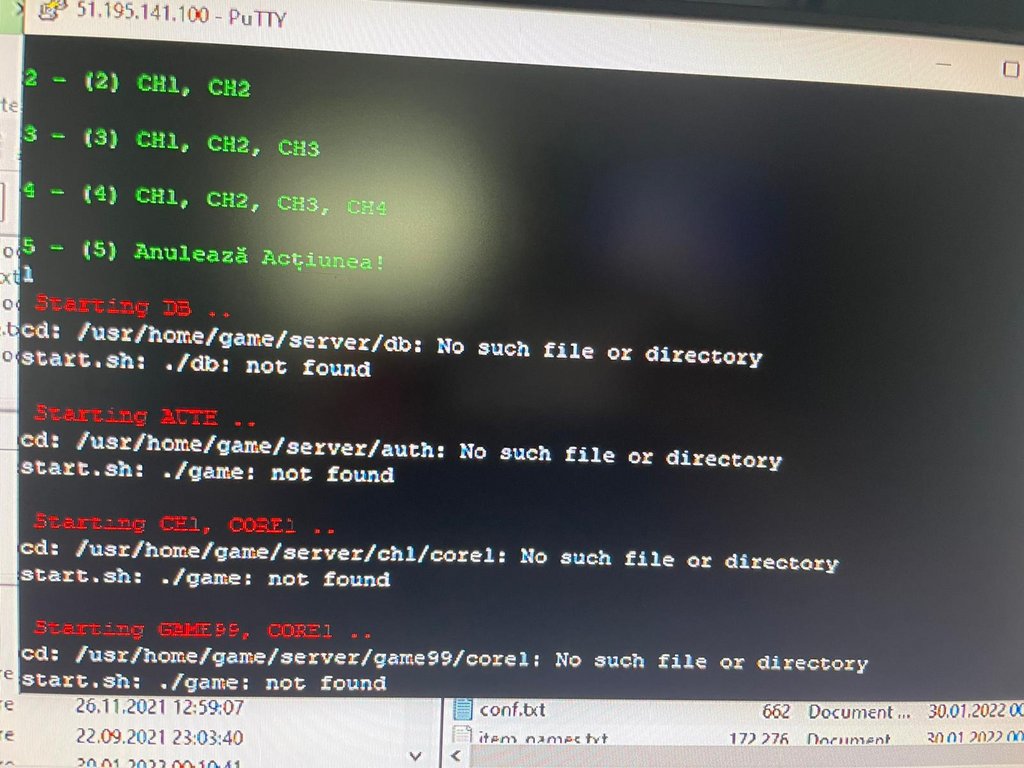
-
- Informaţie
-
Cine este conectat
Utilizatori ce ce navighează pe acest forum: sanducatalin1 și 6 vizitatori