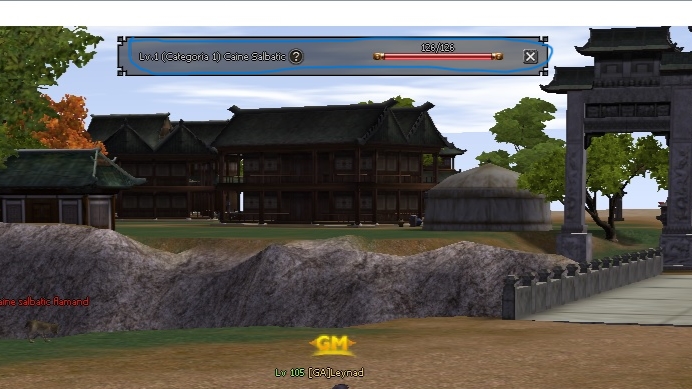
Bug vizual bara Decimal Target HP]

Înainte de a posta o problemă, caută în acest forum și poate găsești rezolvare.
Închis
Avatar utilizator
Cypul
Nivel 2

Nivel 2
Mesaje: 173
Membru din: 12 Iul 2018, 10:31
Regat: Jinno
Aprecieri: 211  
Mulţumiri: 130  
 Contact:
Medalii

*Problemă/Întrebare: Bug vizual TARGET PLAYER HP si TARGET DECIMAL HP
Tipologie server: de la Athero
*Resursă folosită: Nu stiu ca era deja instalate cele 2 sisteme
*ServerFiles utilizat: de la Athero
*Syserr: Nimic
Poză: Imagine *Detalii suplimentare: Asa am luat serverfiles de la Athero si nu are timp de mine, rog pe cineva care stie cum pot regla acest bug vizual care se vede pe partea din mijloc incercuit in poza, eu am incercat dar fara succes
Avatar utilizator
.ShadoW
Nivel 4

Nivel 4
Mesaje: 659
Membru din: 14 Noi 2013, 17:54
Server: not yet..
Regat: Jinno
Aprecieri: 379  
Mulţumiri: 32  
Medalii

vezi in uitarget de fel de thinboard foloseste, du-te in ui.py si la clasa thinboard... pe care o foloseste uitarget, si vezi ca tre sa ai self.base, daca nu ai, ia-te dupa clasa thinboard(window): si pune-i imaginea de baza, asta-i tot
Imagine
Afișează semnătura
Avatar utilizator
alinjuve23
Nivel 2

Nivel 2
Mesaje: 239
Membru din: 23 Apr 2015, 17:10
Aprecieri: 451  
Mulţumiri: 21  
Medalii

Aceiasi problema o am si eu.. nu o avea inainte, nu stiu exact cand a aparut..:
probleme/problema-fereastra-quest-iteme-t103542.html

Apare acel chenar peste tot unde este thinboard..

Inteleg ca este legata de driverul video sau rezolutie client.. am reinstalat driver si incercat cu fiecare rezolutie, dar tot nu merge..
Avatar utilizator
Cypul
Nivel 2

Nivel 2
Mesaje: 173
Membru din: 12 Iul 2018, 10:31
Regat: Jinno
Aprecieri: 211  
Mulţumiri: 130  
 Contact:
Medalii

alinjuve23 scrie: ↑13 Apr 2022, 17:29 Aceiasi problema o am si eu.. nu o avea inainte, nu stiu exact cand a aparut..:
probleme/problema-fereastra-quest-iteme-t103542.html

Apare acel chenar peste tot unde este thinboard..

Inteleg ca este legata de driverul video sau rezolutie client.. am reinstalat driver si incercat cu fiecare rezolutie, dar tot nu merge..
Te asigur ca nu e de la driver video sau rezolutie client

Eu dau UP ca nu am rezolvat, mi-a raspuns si Athero sa vedem daca rezolv problema asta
Avatar utilizator
alinjuve23
Nivel 2

Nivel 2
Mesaje: 239
Membru din: 23 Apr 2015, 17:10
Aprecieri: 451  
Mulţumiri: 21  
Medalii

Nu stiu cine e Athero.. Dar eu am rezolvat cumva !
Am inlocuit toata clasa Thinboard cu cea de la Thinboard gold:

Cod: Selectaţi tot

class ThinBoard(Window):

	CORNER_WIDTH = 16
	CORNER_HEIGHT = 16
	LINE_WIDTH = 16
	LINE_HEIGHT = 16
	BOARD_COLOR = grp.GenerateColor(0.0, 0.0, 0.0, 0.51)

	LT = 0
	LB = 1
	RT = 2
	RB = 3
	L = 0
	R = 1
	T = 2
	B = 3

	def __init__(self, layer = "UI"):
		Window.__init__(self, layer)
		CornerFileNames = [ "d:/ymir work/ui/pattern/thinboardgold/ThinBoard_Corner_"+dir+".tga" for dir in ["LeftTop_gold", "LeftBottom_gold","RightTop_gold", "RightBottom_gold"]]
		LineFileNames = [ "d:/ymir work/ui/pattern/thinboardgold/ThinBoard_Line_"+dir+".tga" for dir in ["Left_gold", "Right_gold", "Top_gold", "Bottom_gold"]]

		self.Corners = []
		for fileName in CornerFileNames:
			Corner = ExpandedImageBox()
			Corner.AddFlag("attach")
			Corner.AddFlag("not_pick")
			Corner.LoadImage(fileName)
			Corner.SetParent(self)
			Corner.SetPosition(0, 0)
			Corner.Show()
			self.Corners.append(Corner)

		self.Lines = []
		for fileName in LineFileNames:
			Line = ExpandedImageBox()
			Line.AddFlag("attach")
			Line.AddFlag("not_pick")
			Line.LoadImage(fileName)
			Line.SetParent(self)
			Line.SetPosition(0, 0)
			Line.Show()
			self.Lines.append(Line)

		Base = ExpandedImageBox()
		Base.SetParent(self)
		Base.AddFlag("attach")
		Base.AddFlag("not_pick")
		Base.LoadImage("d:/ymir work/ui/pattern/thinboardgold/thinboard_bg_gold.tga")
		Base.SetPosition(self.CORNER_WIDTH, self.CORNER_HEIGHT)
		Base.Show()
		self.Base = Base

		self.Lines[self.L].SetPosition(0, self.CORNER_HEIGHT)
		self.Lines[self.T].SetPosition(self.CORNER_WIDTH, 0)

	def __del__(self):
		Window.__del__(self)

	if app.ENABLE_SEND_TARGET_INFO:
		def ShowCorner(self, corner):
			self.Corners[corner].Show()
			self.SetSize(self.GetWidth(), self.GetHeight())

		def HideCorners(self, corner):
			self.Corners[corner].Hide()
			self.SetSize(self.GetWidth(), self.GetHeight())

		def ShowLine(self, line):
			self.Lines[line].Show()
			self.SetSize(self.GetWidth(), self.GetHeight())

		def HideLine(self, line):
			self.Lines[line].Hide()
			self.SetSize(self.GetWidth(), self.GetHeight())

	def SetSize(self, width, height):

		width = max(self.CORNER_WIDTH*2, width)
		height = max(self.CORNER_HEIGHT*2, height)
		Window.SetSize(self, width, height)

		self.Corners[self.LB].SetPosition(0, height - self.CORNER_HEIGHT)
		self.Corners[self.RT].SetPosition(width - self.CORNER_WIDTH, 0)
		self.Corners[self.RB].SetPosition(width - self.CORNER_WIDTH, height - self.CORNER_HEIGHT)
		self.Lines[self.R].SetPosition(width - self.CORNER_WIDTH, self.CORNER_HEIGHT)
		self.Lines[self.B].SetPosition(self.CORNER_HEIGHT, height - self.CORNER_HEIGHT)

		verticalShowingPercentage = float((height - self.CORNER_HEIGHT*2) - self.LINE_HEIGHT) / self.LINE_HEIGHT
		horizontalShowingPercentage = float((width - self.CORNER_WIDTH*2) - self.LINE_WIDTH) / self.LINE_WIDTH
		self.Lines[self.L].SetRenderingRect(0, 0, 0, verticalShowingPercentage)
		self.Lines[self.R].SetRenderingRect(0, 0, 0, verticalShowingPercentage)
		self.Lines[self.T].SetRenderingRect(0, 0, horizontalShowingPercentage, 0)
		self.Lines[self.B].SetRenderingRect(0, 0, horizontalShowingPercentage, 0)
		if self.Base:
			self.Base.SetRenderingRect(0, 0, horizontalShowingPercentage, verticalShowingPercentage)

	def ShowInternal(self):
		self.Base.Show()
		for wnd in self.Lines:
			wnd.Show()
		for wnd in self.Corners:
			wnd.Show()

	def HideInternal(self):
		self.Base.Hide()
		for wnd in self.Lines:
			wnd.Hide()
		for wnd in self.Corners:
			wnd.Hide()
Si am refacut imaginile din "d:/ymir work/ui/pattern/thinboardgold/ThinBoard_Corner.." cu unele ce am background transparent.
Si arata mult mai bine decat cu clasa normala.
Avatar utilizator
Cypul
Nivel 2

Nivel 2
Mesaje: 173
Membru din: 12 Iul 2018, 10:31
Regat: Jinno
Aprecieri: 211  
Mulţumiri: 130  
 Contact:
Medalii

UP
Avatar utilizator
MariusExygo
Fost Helper

Fost Helper
Mesaje: 2063
Membru din: 09 Mar 2014, 15:47
Server: WildFantasy
Regat: Jinno
Aprecieri: 156  
Mulţumiri: 226  
  Rezolvări prob.: 4
Discord: Copiază ID
 Contact:
Medalii

bugul il aveam si eu inainte pe placa amd r9 cand il dadeai pe profil de quality si mie se pare ca are legatura cu antialiasing
Afișează semnătura
Avatar utilizator
Cypul
Nivel 2

Nivel 2
Mesaje: 173
Membru din: 12 Iul 2018, 10:31
Regat: Jinno
Aprecieri: 211  
Mulţumiri: 130  
 Contact:
Medalii

MariusExygo scrie: ↑19 Apr 2022, 15:15 bugul il aveam si eu inainte pe placa amd r9 cand il dadeai pe profil de quality si mie se pare ca are legatura cu antialiasing
Inteleg ca poate fii si de la placa video dar in cazul meu am mai pornit alt client cu sistemele bagate si nu se vede acest bug
Uite dovada Imagine
Avatar utilizator
alinjuve23
Nivel 2

Nivel 2
Mesaje: 239
Membru din: 23 Apr 2015, 17:10
Aprecieri: 451  
Mulţumiri: 21  
Medalii

Nu cred ca iti va da nimeni o rezolvara.. singura metoda ce o poti face este inlocuirea clasei ThinBoard cu asta:

Cod: Selectaţi tot

class ThinBoard(Window):

	CORNER_WIDTH = 16
	CORNER_HEIGHT = 16
	LINE_WIDTH = 16
	LINE_HEIGHT = 16
	BOARD_COLOR = grp.GenerateColor(0.0, 0.0, 0.0, 0.51)

	LT = 0
	LB = 1
	RT = 2
	RB = 3
	L = 0
	R = 1
	T = 2
	B = 3

	def __init__(self, layer = "UI"):
		Window.__init__(self, layer)
		CornerFileNames = [ "d:/ymir work/ui/pattern/thinboardgold/ThinBoard_Corner_"+dir+".tga" for dir in ["LeftTop_gold", "LeftBottom_gold","RightTop_gold", "RightBottom_gold"]]
		LineFileNames = [ "d:/ymir work/ui/pattern/thinboardgold/ThinBoard_Line_"+dir+".tga" for dir in ["Left_gold", "Right_gold", "Top_gold", "Bottom_gold"]]

		self.Corners = []
		for fileName in CornerFileNames:
			Corner = ExpandedImageBox()
			Corner.AddFlag("attach")
			Corner.AddFlag("not_pick")
			Corner.LoadImage(fileName)
			Corner.SetParent(self)
			Corner.SetPosition(0, 0)
			Corner.Show()
			self.Corners.append(Corner)

		self.Lines = []
		for fileName in LineFileNames:
			Line = ExpandedImageBox()
			Line.AddFlag("attach")
			Line.AddFlag("not_pick")
			Line.LoadImage(fileName)
			Line.SetParent(self)
			Line.SetPosition(0, 0)
			Line.Show()
			self.Lines.append(Line)

		Base = ExpandedImageBox()
		Base.SetParent(self)
		Base.AddFlag("attach")
		Base.AddFlag("not_pick")
		Base.LoadImage("d:/ymir work/ui/pattern/thinboardgold/thinboard_bg_gold.tga")
		Base.SetPosition(self.CORNER_WIDTH, self.CORNER_HEIGHT)
		Base.Show()
		self.Base = Base

		self.Lines[self.L].SetPosition(0, self.CORNER_HEIGHT)
		self.Lines[self.T].SetPosition(self.CORNER_WIDTH, 0)

	def __del__(self):
		Window.__del__(self)

	if app.ENABLE_SEND_TARGET_INFO:
		def ShowCorner(self, corner):
			self.Corners[corner].Show()
			self.SetSize(self.GetWidth(), self.GetHeight())

		def HideCorners(self, corner):
			self.Corners[corner].Hide()
			self.SetSize(self.GetWidth(), self.GetHeight())

		def ShowLine(self, line):
			self.Lines[line].Show()
			self.SetSize(self.GetWidth(), self.GetHeight())

		def HideLine(self, line):
			self.Lines[line].Hide()
			self.SetSize(self.GetWidth(), self.GetHeight())

	def SetSize(self, width, height):

		width = max(self.CORNER_WIDTH*2, width)
		height = max(self.CORNER_HEIGHT*2, height)
		Window.SetSize(self, width, height)

		self.Corners[self.LB].SetPosition(0, height - self.CORNER_HEIGHT)
		self.Corners[self.RT].SetPosition(width - self.CORNER_WIDTH, 0)
		self.Corners[self.RB].SetPosition(width - self.CORNER_WIDTH, height - self.CORNER_HEIGHT)
		self.Lines[self.R].SetPosition(width - self.CORNER_WIDTH, self.CORNER_HEIGHT)
		self.Lines[self.B].SetPosition(self.CORNER_HEIGHT, height - self.CORNER_HEIGHT)

		verticalShowingPercentage = float((height - self.CORNER_HEIGHT*2) - self.LINE_HEIGHT) / self.LINE_HEIGHT
		horizontalShowingPercentage = float((width - self.CORNER_WIDTH*2) - self.LINE_WIDTH) / self.LINE_WIDTH
		self.Lines[self.L].SetRenderingRect(0, 0, 0, verticalShowingPercentage)
		self.Lines[self.R].SetRenderingRect(0, 0, 0, verticalShowingPercentage)
		self.Lines[self.T].SetRenderingRect(0, 0, horizontalShowingPercentage, 0)
		self.Lines[self.B].SetRenderingRect(0, 0, horizontalShowingPercentage, 0)
		if self.Base:
			self.Base.SetRenderingRect(0, 0, horizontalShowingPercentage, verticalShowingPercentage)

	def ShowInternal(self):
		self.Base.Show()
		for wnd in self.Lines:
			wnd.Show()
		for wnd in self.Corners:
			wnd.Show()

	def HideInternal(self):
		self.Base.Hide()
		for wnd in self.Lines:
			wnd.Hide()
		for wnd in self.Corners:
			wnd.Hide()
Si refaci / folosesti imaginile de la Thinboard normal, modificate dupa cele de la Thinboard Gold.
Închis
Răspunsuri
6
Vizualizări
156
Răspunsuri
2
Vizualizări
264
Răspunsuri
3
Vizualizări
532

Înapoi la “Probleme rezolvate”

  • Informaţie
  • Cine este conectat

    Utilizatori ce ce navighează pe acest forum: Niciun utilizator înregistrat și 14 vizitatori